
What Is an eSIM? Switching Between eSIM and Physical SIM
Learn what is an eSIM, how it compares with a physical SIM, which devices support it, and what to know before switching or using an eSIM while travelling.
An eSIM is a digital SIM built into a device. If you’re asking what an eSIM is, it’s a way to connect to a wireless network without inserting a physical SIM card: you download and activate a plan, and its service information is stored securely on your device. You can use an eSIM for mobile service at home or while travelling, as long as your device supports it.
Switching between an eSIM and a physical SIM depends on your device and mobile plan. Understanding how each option works can help you choose the right setup. This guide explains how eSIMs connect devices, which devices may support them, and how eSIMs compare with physical SIM cards. You’ll also learn what to consider before switching.
Key Takeaways
- Check your device’s eSIM compatibility and connect to Wi-Fi before downloading and activating a plan.
- Compare digital and physical SIMs by how you install them, manage lines, and use your phone while travelling.
- Switching between SIM types depends on device support and the activation steps for your plan, so understand the transfer process before changing phones.
- For travel connectivity, consider whether a local or regional eSIM data plan fits your destination and data needs.
Table of Contents
Are phones the only eSIM devices?
No. Some tablets, laptops, and smartwatches also support eSIMs, letting them connect to cellular networks without a removable SIM card. An eSIM stores a mobile plan digitally, so a compatible tablet can connect independently rather than relying on a phone’s hotspot. Support depends on the exact device model.
Check compatibility before choosing a plan. iPhone models from XS onward support eSIM, while iPhone 14 and newer models sold in the United States are eSIM-only. For other phones, search the device settings for an eSIM option or check its manufacturer’s specifications. Android menus vary by device and manufacturer.
To activate an eSIM on an iPhone or Android phone, first update the software and connect to Wi-Fi. On iPhone, go to Settings > Cellular > Add eSIM; on Android, go to Settings > Network & Internet > SIMs > Add eSIM.
To get a travel eSIM, choose a plan that covers your destination and fits your data needs. Follow the installation instructions to download the profile over Wi-Fi or scan its QR code. Then follow your phone’s prompts to install and activate it. Keep the QR code available until setup is complete.
A compatible device may store upwards of 20 eSIM plans, but typically only one or two profiles can be active at a time. This lets you keep profiles saved and switch the active line when needed. Travel eSIM plans often provide data only, so they may not include a phone number.
What happens to an eSIM when you reset, lose, or replace your phone? A factory reset can erase the stored profile, so you may need to reinstall it. When replacing a phone, some transfers require deactivating the eSIM on the old device before activating it on the new one. Unlike a physical SIM, a stolen eSIM can’t be removed; disabling or replacing it typically requires authorization.
ESIM benefits and comparison with physical SIM cards
Both SIM types connect compatible devices to cellular networks, but they differ in how they’re installed and switched. Plan costs depend on the data allowance, coverage, and validity period, not simply on the SIM format.
Compatible Devices and Operating Systems
eSIM compatibility means a device can use a digitally stored mobile profile, and it varies by model. Many iPhones released in 2018 or later support eSIM, while selected Samsung Galaxy and Google Pixel phones do too. Some tablets and laptops also connect through eSIM, without a physical card. Check the exact model and regional version before choosing a data plan, since two devices with similar names may differ.
For travelers, the operating system alone doesn’t determine compatibility: an iPhone or Android phone must have eSIM hardware and support the required network bands. A compatible tablet can connect independently, while a laptop may use an eSIM to get online away from Wi-Fi. Check the device model, destination coverage, and plan before installation.
Comparing eSIMs and Physical SIM Cards
An eSIM is a digital profile stored on a device; a physical SIM is a removable card inserted into its tray. This difference affects how you change plans: you install an eSIM digitally, while a physical card must be handled and placed in the correct slot. Both can connect to cellular service, but your device must support the option you choose.
An eSIM can simplify travel setup: add a plan before reaching your destination and avoid swapping your regular SIM card. A physical SIM remains useful on devices without eSIM support and can be moved between compatible phones. An eSIM-compatible phone may also support two lines, such as personal and work service, on one device.
Carrier Locks and Compatibility
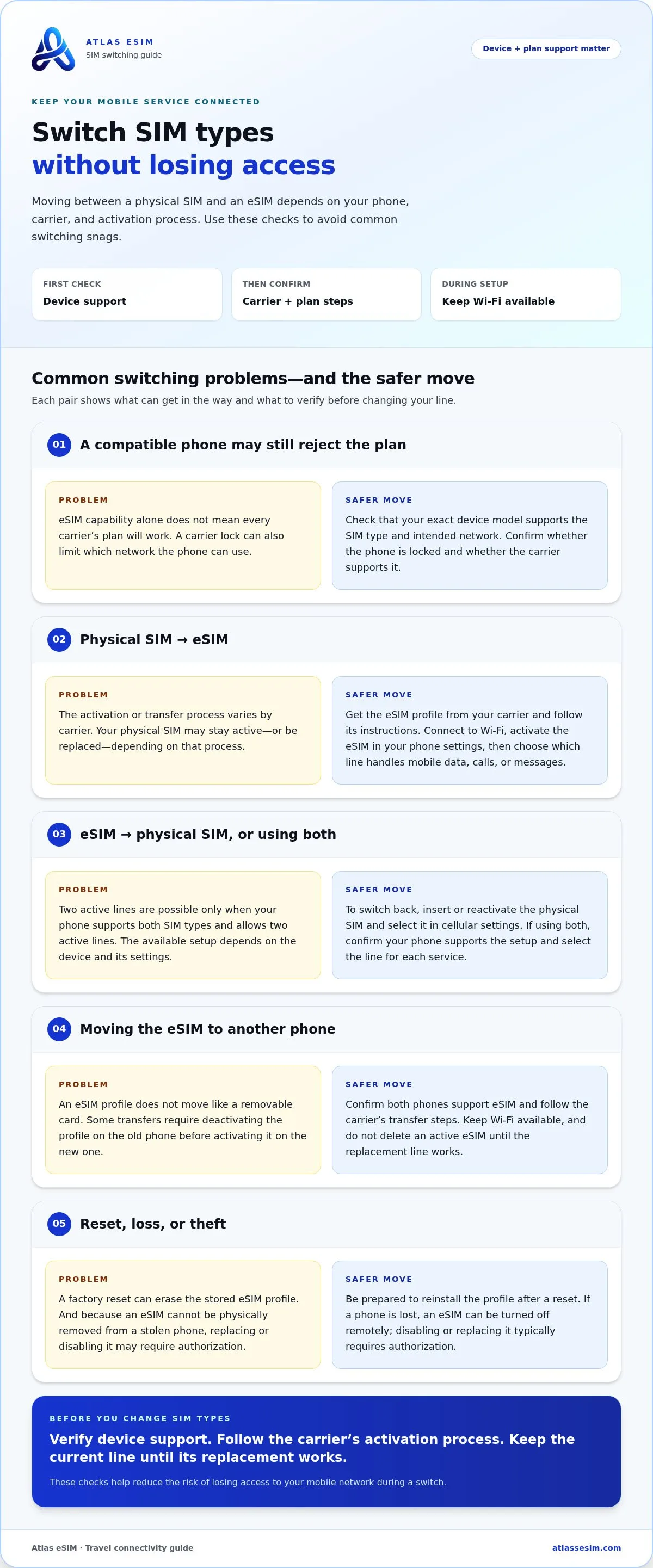
A carrier lock can limit which network a phone can use, even if its hardware supports eSIM. “eSIM compatible” describes the device’s capability; it doesn’t mean every carrier’s plan will work.
Before switching, check whether the phone is locked and whether the intended network supports its model. For example, a locked iPhone may reject an eSIM from another carrier, while an unlocked phone still needs compatible network support. Check both in your device settings or carrier account before relying on a new line while travelling.
Can I switch back and forth between SIM and eSIM?
An eSIM is a digital profile stored in your device; a physical SIM card is removable and fits into a SIM tray. The difference is how you install and move service, not how the mobile network connects your phone.
Can you use an eSIM and a physical SIM at the same time? Yes, if your phone supports both and allows two active lines. For example, keep a physical SIM for your usual number and use an eSIM for another line. The available setup depends on your device and its settings.
To switch from a physical SIM to an eSIM, get the eSIM profile from your carrier and follow its transfer or activation instructions. Then open your device settings, activate the eSIM, and choose which line handles mobile data, calls, or messages. Your carrier’s process determines whether the physical SIM stays active or is replaced.
To switch back, insert or reactivate the physical SIM and select it in your phone’s cellular settings. Moving a plan between devices may take additional steps: both phones must support eSIM, and some transfers require deactivating the old profile before activating it on the new device. Keep Wi-Fi available during digital setup.
Are eSIMs secure, and what risks should users know about? An eSIM profile is stored securely on the device and can’t be physically removed from a lost or stolen phone. A physical SIM can be taken out. A lost eSIM can be turned off remotely, but disabling or replacing it typically requires authorization.
Before changing SIM types, check that your phone supports the option you’ve chosen and that the carrier supports your device. Protect your account details, and don’t delete an active eSIM profile until the replacement line works. These steps help you avoid losing access to your mobile network during the switch.
How eSIMs work
An eSIM uses an embedded chip, called an eUICC, installed inside a device during manufacturing. Instead of inserting a plastic SIM, you download a mobile network profile and activate it. The profile stores service information securely on the device, which uses it to connect to the network. Wi-Fi or another internet connection lets the device download the profile.
After activation, the eSIM identifies your device to the selected mobile network, much like a physical SIM. It doesn’t create coverage or strengthen a signal. Signal strength depends on factors such as nearby network coverage, your location, and your device’s ability to connect to that network. An international plan can provide access through supported networks at your destination.
eSIM technology isn’t limited to phones. Cellular-enabled tablets can use an eSIM for mobile internet, while compatible smartwatches can connect without a phone nearby. Drones need the right cellular hardware to use an eSIM; a standard remote-control connection isn’t the same as mobile network access. In every case, the device must support eSIM and the relevant network.
Mobile network support has expanded across countries: by the end of 2020, more than 175 mobile service providers offered commercial eSIM services in more than 69 countries. Availability still depends on the network and destination. On Android, as on other devices, activation settings and the profile download process vary by model and provider. Once connected, an eSIM uses the network’s available service, not a separate kind of signal.
For travel, compare travel eSIM data plans with your destination and connectivity needs in mind.
Atlas eSIM: Local eSIM data plans
Atlas eSIM offers Local eSIM data plans and Regional Plans for travelers who want mobile data abroad without swapping a physical SIM card. Choose a local plan for one destination or a regional plan for travel across multiple countries. Either option lets you connect using a compatible device and an eSIM profile.
Before choosing, consider where you’ll travel and how much data you expect to use. Plans show the price and data allowance up front, so you can compare those details before installation. Customers usually receive an installable QR code in under 60 seconds, which they can use to set up the eSIM.
For help with a plan or setup, contact Atlas eSIM support via WhatsApp or email. Visit atlassesim.com to explore available plans.
Make your next connection decision with confidence
Knowing what an eSIM is gives you a starting point, but the right setup also depends on how you travel. Consider whether you need connectivity in one destination or several, and how you’ll use your phone during the trip. Planning ahead helps you choose an option that fits your itinerary instead of leaving connectivity to the last minute.
Atlas eSIM offers Local eSIM data plans for travelers visiting one destination and Regional Plans for trips spanning multiple countries. Choose the option that matches your route, then review the plan details before you travel.
If you’re ready to explore travel connectivity or need help choosing a suitable plan, contact Atlas eSIM. Make your next trip easier to prepare, and set off with a connection plan that suits the journey.
Frequently Asked Questions
What is eSIM?
An eSIM is a digital SIM profile associated with a mobile plan. In practical terms, it lets your phone identify and connect to a mobile network without a removable card. The profile and your mobile account are related but distinct: changing the profile on a device doesn’t automatically create a new phone number or account.
What can eSIMs do?
An eSIM can connect a compatible phone, tablet, or other device to cellular service. Depending on the plan, that service may include mobile data, calls, or texts. For example, a data-only plan can provide internet for maps and messaging apps, while a separate line handles regular calls. Available functions depend on the plan and device settings.
Are there any disadvantages to virtual SIM cards?
Yes. An eSIM won’t work on a device without eSIM support, and downloading its profile requires an internet connection. A reset or phone replacement may also mean setting up the profile again. Some travel plans provide data only, without a separate number for ordinary calls or texts. Keep these limits in mind if you rely on one device for every service.
Can I switch to an eSIM with my existing contract?
Often, a carrier can provision your existing mobile line as an eSIM instead of a physical SIM, but the process depends on the carrier, contract, and device. Changing the SIM format alone doesn’t necessarily change your plan. Before you begin, identify your phone model and decide whether you want to keep the same line, then follow your carrier’s eSIM transfer process.
Can I use multiple eSIM profiles on one phone?
Yes. A compatible phone can store upwards of 20 eSIM profiles, although only one or two profiles can usually be active at once. For instance, you could keep a home profile and a travel profile saved, then choose which line to use. Storage capacity and simultaneous active lines vary by phone, so check the device’s eSIM settings.
Does an eSIM change your phone number?
No, installing an eSIM profile doesn’t automatically change the number attached to your existing mobile line. The number depends on the line and plan being activated. A travel data eSIM often doesn’t include a phone number, so your usual number can remain associated with your existing line if you keep that service active.