

Prepaid eSIM Plans for Travelers Abroad
Choose a prepaid esim for international travel with confidence: check device compatibility, compare data limits and coverage, and review security and support.
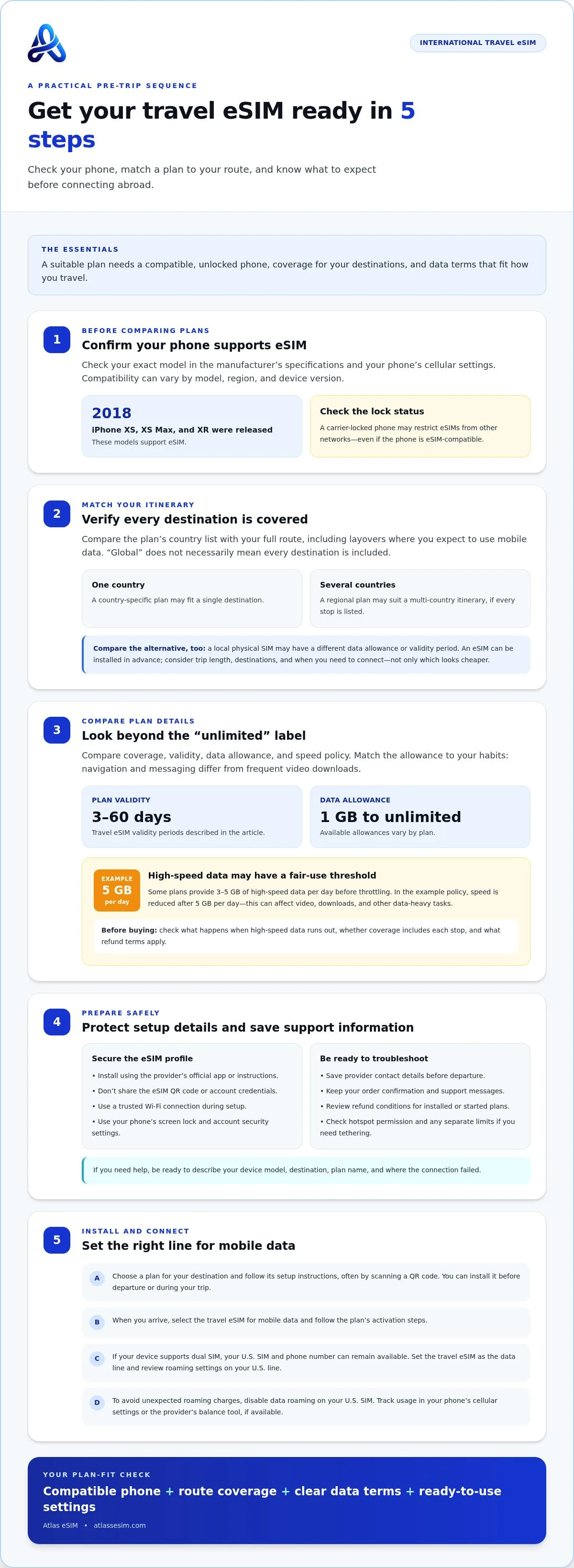
Your phone is the first thing to check before choosing a prepaid eSIM for international travel. The iPhone XS, XS Max, and XR were released in 2018 and support eSIM. Compatibility depends on your specific device, so knowing the model helps you plan before you leave.
Choosing a prepaid eSIM for international travel involves more than finding a plan for your destination. Check device compatibility, compare data allowances and unlimited plans, and understand the plan’s coverage, security, and support before you buy.
Providers define coverage differently, so check whether a plan covers one country or several in a region. Once you know what is included, you can choose an option that fits your route and how you use your phone.
Key Takeaways
- Check your phone’s eSIM compatibility before choosing a travel plan.
- Look beyond “unlimited” labels to understand how fair-use limits can affect speed.
- Know what security protections and customer support to expect while traveling.
- Match destination coverage to your route, then compare local and regional plan options.
Table of Contents
What devices support eSIM?
Start with your exact phone model, not just its brand. The iPhone XS, XS Max, and XR support eSIM; Apple released these models in 2018. Other phones may also support eSIM, but compatibility varies by model, region, and device version. Check the manufacturer’s specifications and cellular settings before comparing plans. A prepaid eSIM for international travel needs both a compatible device and suitable coverage.
To buy and install a travel eSIM, choose a plan for your destination and follow its setup instructions, often by scanning a QR code. You can install it before departure or during your trip. When you arrive, select it for mobile data and follow the plan’s activation steps.
Your U.S. SIM and phone number can remain available if your device supports dual SIM use. Set the travel eSIM as your data line, and review roaming settings on your U.S. line to avoid using it for travel data unintentionally.
Check that your phone is both unlocked and eSIM-compatible. A carrier-locked device may restrict eSIMs from other networks, so confirm its lock status before buying. An eSIM-compatible phone may still not work with a plan if it is locked.
When choosing a prepaid eSIM for international travel, compare destination coverage, plan validity, data allowance, and whether one plan covers every country on your route. A regional plan may suit a multi-country itinerary, while a country-specific plan may fit a single destination. Match the coverage list to every stop, including layovers where you expect to use mobile data.
Compare plan costs with the practical alternative of buying a local SIM after arrival. A physical SIM may have a different data allowance or validity period, while an eSIM can be installed in advance. Consider trip length, destinations, and how soon you need to connect, not just which option appears cheaper.
Do eSIMs offer unlimited data?
Yes, some travel eSIMs advertise unlimited data, but the label doesn’t always mean unlimited high-speed use. Some plans provide 3-5 GB of high-speed data per day before throttling. An example fair-use policy sets high-speed data at 5 GB per day; after that, reduced speeds can affect video, downloads, and other data-heavy tasks.
Travel eSIM validity periods range from 3 to 60 days, while data allowances range from 1 GB to unlimited. A monthly global plan may suit a longer trip across countries, while a prepaid destination or regional plan can match a shorter itinerary. Compare the coverage area, allowance, validity, and speed policy before purchase. The right fit depends on how long you travel and what you do online.
Potential drawbacks include gaps in destination coverage, reduced speeds after a fair-use threshold, and refund terms that vary by plan. Read the coverage and speed details before buying, and review the refund policy before payment.
To avoid unexpected roaming charges, set the travel eSIM as your mobile data line and disable data roaming on your U.S. SIM. Track usage in your phone’s cellular settings, and use the provider’s balance tool if available. Pause automatic downloads and video streaming when your data allowance is limited.
“Always On” may describe continued connectivity, but the label alone doesn’t explain the plan’s speed, data allowance, or coverage. Read the terms to find out what happens when included high-speed data runs out. Check whether the connection remains suitable for maps and messages or is limited to specific tasks.
Compare the listed data allowance with your habits: navigation and messaging differ from frequent video downloads. For multi-country trips, confirm that each stop falls within the plan’s region. A local network connection can also vary by destination, so coverage and speed policies matter alongside the unlimited label. To compare destination and regional options, review travel eSIM plan formats.
Security features and customer support
Before installing a travel data plan, review how setup, account access, support, and hotspot use work. Knowing these details can help you connect with fewer surprises if something goes wrong abroad.
Security Features
An eSIM uses a digital profile instead of a removable physical card. While this means you don’t have to handle a SIM card, it doesn’t replace safe account habits. Install the profile using the provider’s official app or instructions, and don’t share its QR code or account credentials. Use a trusted Wi-Fi connection during setup, especially before leaving home.
Protect your phone with its screen lock and account security settings. If you lose the device, use its built-in remote lock or erase feature, then contact the provider about suspending the eSIM profile. A secure setup helps, but the phone’s operating system, account access, and your actions all matter.
Customer Support and Refunds
Support is most useful when you can describe the problem clearly. Save the provider’s contact details before departure, then include your device model, destination, plan name, and the step where the connection failed. For example, explain whether installation stopped, mobile data won’t connect, or the local network appears unavailable.
Refund rules vary by provider and plan. Read the conditions before buying, including how they apply to an installed profile, a plan that has started, or a destination where coverage fails. Keep your order confirmation and support messages so you can describe the issue clearly if you need help.
Hotspot support matters if you plan to connect a laptop or share data with another device. Check the plan terms for tethering permission and any separate hotspot limits. Then enable your phone’s hotspot and test it with one device before relying on it for work or navigation.
If you switch between a U.S. line and a travel eSIM, label each clearly in your phone settings. Select the intended line for mobile data, and keep account details accessible offline. These steps make it easier to troubleshoot and stay connected in the United States or abroad.
International eSIM providers and destination coverage
“Global” doesn’t necessarily mean that one plan covers every destination. Providers define coverage by the countries and networks included, so compare the plan’s list with your full itinerary. For example, a Europe plan may include France and Italy, while a stop outside its listed region may require a separate data plan.
Coverage depends on the local network used at each destination. A provider may use different networks in different countries, and service can vary between cities, rural areas, buildings, and transport routes. Read the destination details and compare the listed network access with where you plan to use mobile data. The country list is more useful than a broad “global” label.
Use this quick comparison before choosing:
- Single destination: Match a local plan’s country coverage to the place you’ll spend time.
- Several countries: Compare regional plans against every stop, including border crossings.
- Long or changing routes: Check whether one global plan covers the countries and networks on your itinerary.
Plan how you’ll connect after arrival. Keep the eSIM selected for mobile data, then follow the provider’s setup steps if your phone doesn’t connect automatically. If service drops, check that you’re in a covered destination and review your network settings. A coverage list shows where a plan is intended to work, not whether there will be a signal in every station, hotel, or mountain area.
Compare data plans by destination coverage, validity, data allowance, and the networks they use. For example, a traveler spending a week in Spain has different coverage needs from someone visiting Spain, France, and Italy. The clearest choice is the plan whose country list matches your route, not the one with the broadest-sounding label.
Compare eSIM coverage options for your route and match the destination list to each stop abroad.
Atlas eSIM: Local eSIM data plans
Atlas eSIM offers local eSIM data plans for trips focused on one destination and Regional Plans for journeys across multiple countries. Choose based on your route, then compare the listed coverage and data allowance with how you’ll use your phone abroad.
Plans show the price and data allowance up front, making the details easier to review before purchase. Customers usually receive an installable QR code in under 60 seconds, so they can set up their eSIM before travel and prepare to connect on arrival. Support is available 24/7 through WhatsApp or email if a setup or connection question comes up.
For a single-country visit, start with a local plan. For a route spanning countries, compare Regional Plans against each destination on your itinerary. Visit Atlas eSIM’s travel plan options to explore the choices.
Set up your next trip with confidence
Choose connectivity to match the way your trip unfolds. Before leaving, map your stops and decide where you’ll need mobile data most. This gives you a practical basis for choosing a prepaid eSIM for international travel instead of relying on a plan label that may not match your route.
Atlas eSIM offers Local eSIM data plans for single-destination trips and Regional Plans for travel across multiple countries. Choose the option that fits your itinerary, then review its coverage and data details as part of your travel preparation.
Ready to explore an option for your route? Contact Atlas eSIM and take the next step toward a more prepared trip.
With a plan suited to your journey, you can focus on where you’re going and what you want to do there.
Frequently Asked Questions
What is an eSim card?
An eSIM is a digital SIM profile built into a compatible device. Instead of inserting a small plastic card, you install the profile electronically, often by scanning a QR code or following an app’s setup steps. The profile connects your device to a mobile network. You’ll need an eSIM-compatible phone and a plan that covers your destination.
Are eSIMs cheaper than physical SIM cards for travel?
Not always. Compare the plan’s total cost with its data allowance, validity, coverage, and any costs involved in getting a local SIM. An eSIM may be convenient for a short stop, while a local SIM may suit a longer stay with heavier data use. The cheapest option depends on your itinerary and how much mobile data you’ll use.
Can I buy an eSIM for multiple countries?
Yes. Regional and multi-country eSIM plans can cover several destinations under one plan. Before buying, match the plan’s country list to every stop on your itinerary. A plan labeled for Europe, for example, may not include every European destination. If your route includes a country outside its coverage area, you’ll need another way to connect there.
Can I call and text with an eSIM?
It depends on what the eSIM plan includes. A data-only plan supports internet-based calls and messages through apps such as WhatsApp, but it doesn’t automatically provide a regular phone number for cellular calls or SMS. You can use your existing line for those services if it remains active, while selecting the travel eSIM for mobile data.
Can I keep my WhatsApp number?
Yes. Installing a travel eSIM doesn’t require you to change the number registered with WhatsApp. Keep your account set up with your usual number, then use the eSIM’s data connection to send messages or make app calls. If WhatsApp asks whether to update your number during setup, choose the option that keeps your existing account number.
Do I have to activate data roaming on my device?
Follow your travel eSIM’s setup instructions, since some plans require data roaming to be enabled on the eSIM. To reduce the risk of charges on your U.S. line, select the travel eSIM for mobile data and keep roaming off on your home line. Check which line is selected before using maps, browsing, or downloading abroad.