
Panama eSIM Plans for Travel, Setup, and Everyday Use
Compare eSIM Panama plans for data, calls, setup, and everyday apps. Learn what to check before travel, how activation works, and choose a plan that fits.
The biggest data plan isn’t automatically the best fit for Panama. A good eSIM for Panama should match how you’ll use your phone, whether that means checking maps, messaging, or staying online throughout the day. You’ll also want to know what details are needed to set it up and whether calls are included.
It’s reasonable to want clear terms before you travel, without surprises during setup or uncertainty about what your plan covers. This guide explains what to look for in a Panama eSIM provider, what information you may need to provide, and what to expect from data, calls, navigation, and everyday apps.
You’ll also learn how local and regional plans differ, how installation and activation fit into travel preparation, and when a data-only plan may suit your needs. With those basics clear, you can choose an option that fits your trip and arrive ready to connect.
Key Takeaways
- Confirm your phone supports eSIM before choosing a plan, then consider how you’ll use data for maps, messaging, and apps.
- Know what information setup requires and keep the eSIM installed while its data or validity remains active.
- Compare data allowances, validity periods, and unlimited options against your trip and typical phone use.
- Check whether a plan includes calls or only data so you can plan how to stay in touch.
Table of Contents
Can I use the eSIM for navigation, calls, and apps?
Yes. A compatible, unlocked smartphone can use an eSIM for mobile data, navigation, and apps such as Google Maps and WhatsApp. Most iPhone XS and newer models, and many recent Android devices, support eSIM. Check our compatible devices list before you buy.
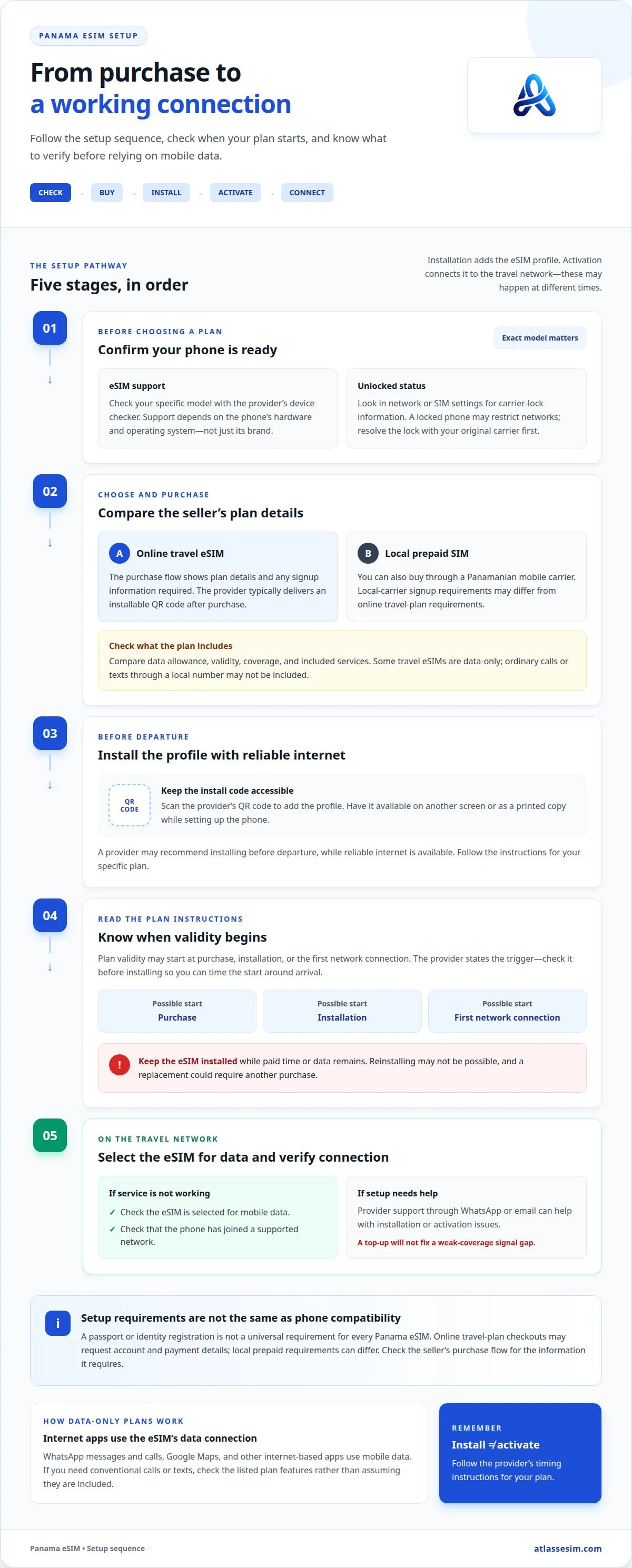
First, confirm your phone supports eSIM and is unlocked. Find the model in your device settings, then look for carrier-lock information in the network or SIM settings. A locked phone may restrict which networks it can use, so resolve the lock with your original carrier before installing an eSIM.
Compatibility depends on the phone’s hardware and operating system, not just its brand. A provider’s device checker can help identify whether your specific model supports eSIM. For example, two Android smartphones from the same manufacturer can have different eSIM support. Confirm the exact model before purchase, then follow the provider’s steps to download and add the profile. Keep your operating system current to access its available network and SIM settings.
A prepaid physical SIM and an eSIM can both connect your phone to mobile data. A physical SIM requires inserting a card, while an eSIM installs digitally as a secondary line. You can keep your home SIM active for calls and SMS. Travel eSIM plans are often data-only, so WhatsApp calls use mobile data rather than an ordinary phone number. Google Maps, messaging, and other internet-based apps also use mobile data.
Hotspot and tethering work when the eSIM plan supports them and your phone has the feature enabled. This lets a laptop or tablet use the phone’s mobile data connection. Check the plan details for tethering support before relying on it during your trip.
How a provider helps you purchase, install, and activate an eSIM
A provider guides the purchase, delivers the installable profile, and explains when its plan starts. The key details are the signup requirements, installation timing, and validity trigger.
Purchasing an eSIM through a provider
Choose a travel eSIM online or buy a prepaid SIM through a Panamanian mobile carrier. The purchase flow shows the plan details and any signup information the seller requires. A travel eSIM provider typically delivers an installable QR code after purchase; the code can be scanned to add the profile. Local-carrier requirements may differ from online travel-plan requirements. Explore Panama setup options before choosing.
Installation and Activation Timing
A provider can recommend installing the profile before departure, while reliable internet is available. Installation adds the eSIM to the phone; activation connects it to the travel network. These steps may happen at different times, so follow the provider’s instructions for the specific plan. If a QR code is supplied, keep it accessible on another screen or printed copy while setting up the device.
Plan Activation and Validity
Validity may begin at purchase, installation, or the first network connection, depending on the plan’s terms. Read the activation instructions before installing, especially if you’re preparing well before travel. A provider states the plan’s validity trigger so you can time the start around arrival. Don’t delete an eSIM while paid time or data remains: reinstalling may not be possible, and a replacement could require another purchase.
Identity Requirements for Activation
A passport or identity registration isn’t a universal requirement for every Panama eSIM. Online travel-plan checkouts may request account and payment details, while local prepaid sign-up requirements can differ. Check the seller’s purchase flow for any required information. These requirements are separate from eSIM compatibility, which depends on your phone and its carrier-lock status.
For setup trouble, check that the eSIM is selected for mobile data and the phone has joined a supported network. Weak local coverage can interrupt service; a top-up won’t fix a signal gap. Support through WhatsApp or email can help resolve installation or activation issues.
Are there eSIMs for Panama with unlimited data?
Yes, Atlas eSIM offers Unlimited Data plans for travelers using an eSIM in Panama. Choose based on your data use, trip length, and whether you need calls or texts. Unlimited plans have fair-use rules, which are shown upfront.
Data Allowances and Validity Periods
A data plan combines an allowance with a validity period. For example, one plan listing for Panama offers 15 GB for 30 days. Match the allowance to your activities: maps and messaging use data, while video streaming and file uploads can consume it faster. Consider your full travel schedule, not just the days spent in Panama.
Unlimited data can suit travelers who use mobile internet heavily or don’t want to monitor a fixed allowance. Check how long the package lasts and when its validity begins. The plan’s duration matters if you arrive before the first day you need service or stay longer than the included period. A top-up or a second plan may be relevant when your allowance or validity runs out.
Data-Only Plans and Calling Features
Some travel eSIMs are data-only and don’t provide a phone number. They support internet-based services rather than ordinary calls or texts through a local number. WhatsApp messages and calls use the data connection, as do apps such as Google Maps.
Before choosing a plan, decide whether app-based communication meets your needs. If you need conventional calls or texts, check the listed plan features rather than assuming they’re included with data. A physical SIM and an eSIM are different ways to connect your phone, but neither label alone tells you whether a plan includes calls, texts, or unlimited data.
For an eSIM for Panama, compare data allowance, validity, coverage, and included services together. A capped plan may suit lighter use, while Unlimited Data can work for frequent browsing, subject to fair-use rules. Your route and use of internet-based apps also affect how much data you’ll need.
Recommended eSIM providers and plans for Panama
Start your shortlist with the network, data allowance, validity, and phone compatibility. Panama had little 5G availability as of 2026, so don’t choose a plan based on a 5G label alone. Coverage at your destination and the network used by the plan matter more for staying connected.
Panama eSIM listings identify +Movil - C&W PAN as a primary network. Treat that network name as a useful comparison point, then consider where you’ll travel and what your phone supports. A plan can only connect through the networks it uses, and local coverage affects service in each destination.
Compare plans by the details that affect your trip, not just by a headline. Check the listed data allowance and validity against your stay, then confirm whether the plan covers Panama alone or other countries on your itinerary. A regional plan can suit multi-country travel, while a local plan is designed for a trip focused on one destination.
Match the data allowance to your routine. Google Maps, messaging, email, and browsing need mobile data; video calls and streaming use more. If your phone supports eSIM but the plan’s network doesn’t provide coverage where you’re going, a larger allowance won’t solve the connection issue. Check the listed coverage and supported network before purchase.
Use a simple comparison: network first, then coverage for your route, data allowance, validity, and included calling features. For example, a traveler using Google Maps and messaging may prioritize a suitable data allowance, while someone crossing borders may value regional coverage. Choose a compatible plan that fits your actual travel pattern, rather than assuming every eSIM connects to the same network or includes the same features.
Atlas eSIM
Atlas eSIM offers local and regional prepaid data plans for travel in Panama and across multiple countries. Choose based on your route and expected data use. Plan prices and data allowances are shown before checkout, so you can compare options before buying.
After purchase, customers usually receive an installable QR code in under 60 seconds. Support is available 24/7 through WhatsApp or email for questions about setup. A local plan can fit a Panama-focused stay; a regional plan may suit an itinerary that crosses borders.
For a practical next step, decide which destinations need coverage and how much mobile data your trip calls for. Contact Atlas eSIM to discuss your Panama travel connectivity needs.
Plan your connection around the journey ahead
Plan connectivity alongside transport and accommodation. Note where you’ll need maps, messages, or online bookings, and whether your route stays in Panama or crosses borders. This makes it easier to choose an eSIM that fits your trip before you arrive.
Atlas eSIM offers local eSIM data plans and regional plans for different travel routes. Consider the countries on your itinerary and how you expect to use mobile data, then choose the plan that fits. Matching your choice to your route makes preparation more straightforward.
If you’d like help choosing a suitable option for your trip, contact Atlas eSIM for help. Take the next step with a plan that fits your journey, and travel with one less detail to sort out on the way.
Frequently Asked Questions
How can a provider help you get an eSIM for Panama?
A provider helps you select a plan for your route, complete the purchase, and understand the setup requirements. Before choosing, match the plan’s country coverage to your itinerary and confirm your phone supports eSIM. For example, a trip limited to Panama calls for different coverage considerations than a route that includes other countries. The provider’s plan details help you understand what you’re buying.
When does a provider recommend installing an eSIM?
Install your eSIM before departure, while you have a reliable internet connection and time to follow the setup instructions. You can install it at home, then start using data when you begin using it at your destination. Keep the QR code or installation instructions accessible until setup is complete, rather than relying on a last-minute airport connection.
Are eSIMs the best way to stay connected when traveling to Panama?
An eSIM is a practical option if your phone supports it and you want to arrange mobile data before travel. It avoids carrying a separate SIM card, but it isn’t the right fit for every traveler. Consider whether you need a local phone number, whether your phone is unlocked, and whether the plan covers your route. Those needs determine whether an eSIM fits better than other connection options.
Do I need to change plans if I extend my trip or add countries?
Before extending your itinerary, review your plan’s remaining validity, data allowance, and country coverage. A longer stay may outlast the plan’s validity, and an added country may fall outside its coverage. If your plans change, choose a plan that covers the additional time or destination. A regional plan can suit a route spanning several countries, while a local plan is designed for a trip focused on one destination.
Which eSIM providers offer data plans for travelers visiting Panama?
Atlas eSIM offers prepaid local eSIM data plans and regional plans for travelers. For a trip focused on Panama, consider a local plan; for travel across several countries, consider regional coverage. Compare the destinations covered with your route before purchase. Plan prices and data allowances are shown before checkout, so you can choose based on where you’re going and how you expect to use mobile data.
How much do Panama travel eSIM plans cost, and how much data do they include?
There isn’t one price or data allowance for every Panama travel eSIM plan. Each prepaid plan has its own data allowance and validity, so compare the details with your trip length and expected phone use. Atlas eSIM shows prices and data allowances before checkout, making it easy to review the specific plan you’re considering.