
ESIM for the Dominican Republic: Plans and Device Support
Compare eSIM Dominican Republic plans, prices, coverage, and compatible devices. Learn when to buy and install your travel eSIM for a smooth connection.
Getting connected in the Dominican Republic starts with choosing an eSIM for the Dominican Republic before you arrive. To use it for data, turn on the eSIM and select it while you’re within its coverage area. Buying 1-2 days before your trip leaves time to prepare.
Before choosing an eSIM for your Dominican Republic trip, check that your phone supports eSIM. The right plan depends on how much data you expect to use and how long you need it, so compare the plan details before you buy.
This guide explains how a travel eSIM can connect you, what to compare in data plans, which devices support eSIM, and when to install your plan. You’ll also learn how to choose an eSIM for the Dominican Republic, with prices and data allowances shown before checkout.
Key Takeaways
- Learn how coverage and supported networks affect where your data plan can connect during your trip.
- Compare plans by their data allowance and upfront price to find an option that fits your travel needs.
- Plan when to purchase and install your eSIM so it’s ready when you arrive.
- Check device support before choosing a plan, including compatibility for iPhone XS and newer and Google Pixel 3+ devices.
Table of Contents
How can a provider help you get an eSIM for the Dominican Republic?
A travel eSIM can provide mobile data through a digital plan for use at your destination. Unlike roaming on your existing mobile arrangement or using a separate physical SIM card, it installs as a secondary digital line. When choosing an eSIM for the Dominican Republic, compare the plan’s stated coverage and setup details with your itinerary.
Local Carriers and Network Speeds
Coverage depends on the local mobile networks available in each location. Check the plan’s coverage details against your itinerary, including stays in Santo Domingo, Punta Cana, or smaller coastal destinations.
Signal and mobile speeds can vary between a city center, a resort, and a rural road. Buildings, terrain, and local network conditions all affect connectivity. Coverage does not guarantee service everywhere, so consider your route rather than assuming the signal will be the same across the country. A connection near your hotel, for example, may differ from one on a more remote drive.
Use the plan’s stated coverage and supported network details to assess the fit. Don’t infer them from your phone’s country setting or from an eSIM used in Europe. Before you install your eSIM, review those details for each destination on your itinerary. To use it for data, turn it on and select it within its coverage area.
ESIM, Roaming, and Physical SIM Options
What are the advantages of an eSIM compared with roaming or a physical SIM? The right choice depends on your phone, itinerary, and preferred setup. An eSIM installs as a secondary digital line, roaming uses your existing mobile arrangement, and a physical SIM requires handling a separate card. An eSIM for the Dominican Republic can be a practical choice if your phone supports eSIM and you prefer digital setup.
Compare coverage, data allowance, and validity with your expected use. For example, navigation between your hotel and a beach destination requires connectivity along the route, not just at your arrival point. Check the plan’s coverage details against your itinerary before choosing.
Consider whether your trip stays in one country or continues elsewhere. A local plan may suit a single destination, while a regional plan may fit a multi-country route. Before traveling, understand which phone line is set to use mobile data so you can select the intended connection when you arrive.
Dominican Republic eSIM data plans and prices
Compare the prepaid price, data allowance, and validity shown for each plan. For an eSIM for the Dominican Republic, choose based on how you expect to use mobile data during your stay.
Plan Prices and Data Allowances
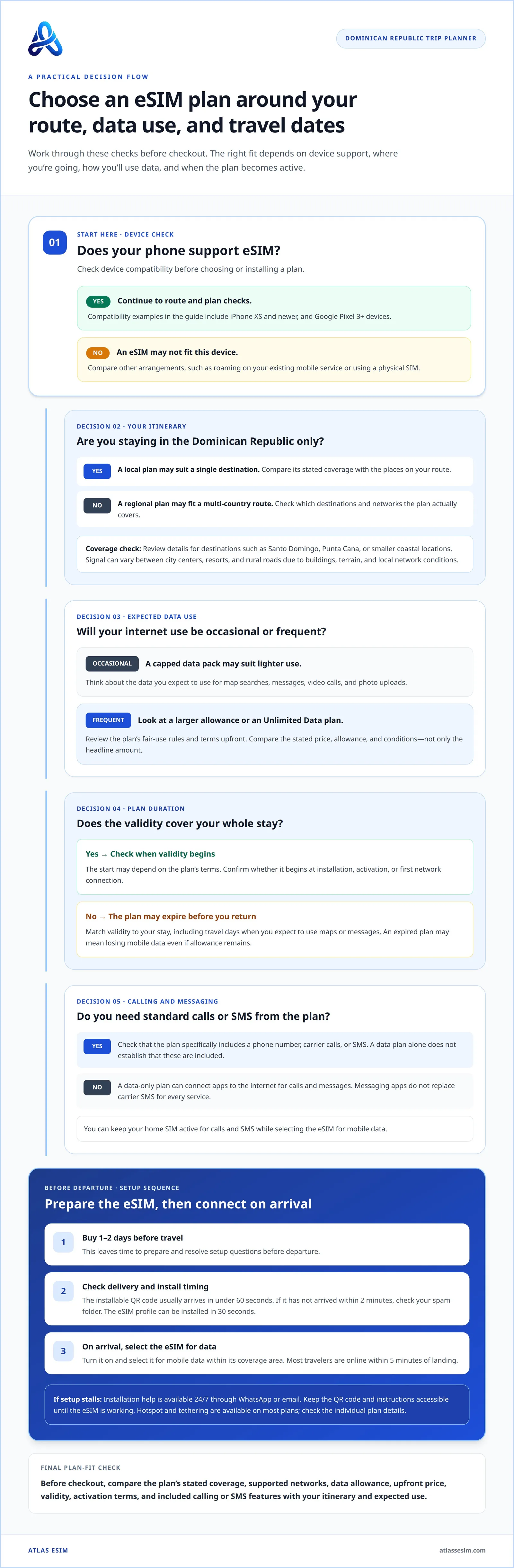
Plans vary in price and data allowance. Compare the price shown before checkout with your expected use, not just the headline amount. Map searches, video calls, and photo uploads use data differently from occasional messages. A capped data pack may suit lighter use, while frequent online activity may call for a larger allowance.
An Unlimited Data plan may suit travelers who expect frequent internet use. Review its fair-use rules upfront and check that the plan fits your trip. Comparing the price, plan details, and terms together helps you understand what you’re choosing before checkout.
Plan Validity Periods
Validity tells you how long a plan remains active. Match it to your stay, including travel days when you’ll use maps or messages. If a plan expires before your return, you may lose mobile data even if some allowance remains.
Check when the plan’s validity begins. This depends on the plan’s terms, so confirm how its start time relates to installation and first use. That matters if you install the eSIM before departure but want the active period to cover your days in the Dominican Republic.
Calls, Texts, and Data-Only Plans
Can a travel eSIM handle calls and texts, or does it provide data only? A data plan connects your phone to the internet, so apps can use data for calls and messages. Standard mobile calls and SMS depend on whether the plan specifically includes them.
Before choosing an eSIM for the Dominican Republic, check whether the plan includes a phone number, carrier calls, or SMS. Messaging apps can send messages over data, but they don’t replace carrier SMS for every service. You can keep your home SIM active for calls and SMS while using the eSIM for mobile data.
When to buy and install a Dominican Republic eSIM
Buy your eSIM 1-2 days before travel, leaving time to prepare and resolve setup questions. The right installation timing depends on when its data plan activates.
Buying and Installing Your eSIM
After purchase, the installable QR code usually arrives in under 60 seconds. If it hasn’t arrived within 2 minutes, check your spam folder. A provider can guide you through installation and help you understand whether the plan starts on installation, activation, or first network connection.
The eSIM profile can be installed in 30 seconds, but allow time before departure to complete setup calmly. Confirm device compatibility before installation, then follow the provider’s instructions for adding the profile. This keeps arrival tasks simple and gives you time to address an installation issue before travel.
Activation and Setup Support
Installation and activation are separate steps. The profile can be on your phone before departure, while data use begins when the plan activates under its terms. On arrival, select the eSIM for mobile data and turn it on within its coverage area. Most travelers are online within 5 minutes of landing.
If setup stalls, support can help identify whether the issue involves the profile, activation, or data settings. Installation help is available 24/7 through WhatsApp or email. Share the exact step that failed, such as scanning the QR code or connecting after landing, so support can respond to the relevant setup problem.
Think ahead about how you’ll stay connected during the first part of your trip. If you need a hotspot for a laptop, hotspot and tethering are available on most plans, and availability is shown on each plan page before checkout. Keep the QR code and installation instructions accessible until the eSIM is working. Installing before departure can help you avoid relying on airport Wi-Fi.
Device compatibility
iPhone XS and newer models support eSIM, as do Google Pixel 3+ devices. Whether a phone connects in the Dominican Republic also depends on the plan’s supported network and destination coverage.
Before choosing a plan, match the exact phone model with its eSIM capability. A familiar brand name alone isn’t enough: models can differ, and a device that supports eSIM still needs access to the network used by the plan. This distinction helps avoid confusing phone compatibility with coverage.
Use this quick check before travel:
- Identify your phone’s exact model, such as iPhone XS or Google Pixel 3.
- Confirm that the model supports eSIM.
- Compare the plan’s supported network with its Dominican Republic coverage.
- Review your phone’s mobile settings so you can select the eSIM for data after arrival.
An eSIM may not automatically become your active data line. Your phone can retain its existing SIM settings, so select the travel eSIM for mobile data when you reach its coverage area. This helps prevent unintended roaming on your other line.
Supported-device lists are a starting point, not a guarantee that every model variant behaves identically. For example, an iPhone XS may support eSIM, while the plan still needs to cover the network and places on your itinerary. A provider can help align those details before installation, including the model, network, and intended destination.
Compatibility also affects setup. If your phone can’t add an eSIM profile, installation won’t complete, even if the plan covers your destination. If the profile installs but doesn’t connect, check the selected data line, activation status, and plan coverage separately. This makes troubleshooting clearer.
Before you travel, check that your phone supports eSIM and compare the plan’s stated coverage with your destination. For device compatibility, check the compatible devices list before you buy.
Atlas eSIM
Atlas eSIM offers prepaid data plans for travelers visiting the Dominican Republic. Local eSIM data plans suit trips focused on one destination, while Regional Plans can fit itineraries that include several countries. Prices and data allowances are shown before checkout.
Plan details show the price and data allowance up front, helping you match an option to your expected internet use. After purchase, customers usually receive an installable QR code in under 60 seconds. Check that your phone supports eSIM and review the plan’s coverage before choosing, then use its installation instructions to prepare before departure.
If you’re comparing plans or need help deciding which option fits your route, contact Atlas eSIM for assistance.
Make connectivity part of your travel plan
Before your trip, decide what you need your phone to do when you arrive. Navigation, messaging, and sharing updates all depend on a connection that fits your plans. Treat your eSIM for the Dominican Republic as part of your preparation, alongside your itinerary and device.
Match your expected data use to a plan, then keep the setup details accessible while you travel. This makes it easier to move from planning to using mobile data without leaving the decision until you need a connection. Choose a plan that suits your route and phone use, rather than paying for features you don’t need.
If you’d like help with your options, contact Atlas eSIM for help. You can move ahead with a clear plan for staying connected and focus on the trip itself.
Frequently Asked Questions
When should a provider help you install your eSIM?
A provider can help before departure or during setup if the profile won’t install or connect. For example, if your phone displays an error after scanning the QR code, support can help identify whether the issue involves installation or your device settings. Getting help before you leave gives you time to resolve setup problems without relying on airport internet.
Which eSIM providers offer coverage in the Dominican Republic?
Atlas eSIM offers travel data plans, including local and regional options. To choose one for a Dominican Republic trip, look for the country in the destination coverage details for the specific plan. A regional plan may suit an itinerary with several countries, while a local plan is designed around one destination. Coverage details, not the provider name alone, determine which plan fits.
What are the best Dominican Republic eSIM plans for tourists?
The right plan depends on your route and how you use mobile data. A traveler mainly using maps and messages may prefer a capped data pack, while someone regularly uploading photos or working online may consider an Unlimited Data plan. A stay in one destination differs from a multi-country itinerary, so choose a plan that fits your trip and review the fair-use rules upfront.
How much does a Dominican Republic eSIM cost, and how much data is included?
There isn’t one fixed price or data allowance for every plan. Atlas eSIM plans are prepaid, and the price and allowance are shown before checkout. Compare them with your expected use, such as navigation, messaging, and video calls. Unlimited Data plans have fair-use rules, so review them alongside the plan’s validity before you buy.
Which local networks do travel eSIMs use in the Dominican Republic?
The network depends on the eSIM plan’s coverage details. Don’t assume every travel eSIM uses the same network. If your itinerary includes both a resort and a less-populated area, compare the plan’s stated coverage with those destinations. The network name provides context, but coverage for your actual route matters most.
How good is mobile coverage and 4G or 5G availability across the Dominican Republic?
Coverage and connection type can vary by location, network partner, and device. A connection in a major city may differ from one on a rural road or inside a building. 4G or 5G access also depends on the network and compatible phone. Treat coverage maps and plan details as guidance for your route, rather than assuming one speed everywhere.