
ESIM for Bali: Compare Data Plans and Choose the Right One
Find the best esim for bali by comparing local and regional data plans, checking phone compatibility, and matching data limits to your itinerary and budget.
The best eSIM for Bali depends less on the biggest data allowance than on your phone’s compatibility, your data needs, and whether you’ll travel beyond Indonesia. If you expect to use more than 50 GB, consider a local SIM; otherwise, compare local and regional eSIM data plans for your trip. A phone’s IMEI may be blocked from using local SIM cards after 90 days unless import taxes are paid.
You don’t need an eSIM to visit Indonesia, but the best eSIM for Bali can keep you connected without swapping your physical SIM. Before buying a plan, make sure your phone supports eSIM and isn’t carrier-locked.
This guide explains how to compare data plans, when an eSIM makes sense for Bali and the rest of Indonesia, and what to check on your phone first. You’ll also learn how to choose between a local plan, a regional plan, and other connectivity options based on your itinerary and expected data use.
Key Takeaways
- Match your data allowance to how you’ll use your phone, and read the speed terms carefully before choosing an unlimited plan.
- Choose a plan around your travel style, whether you’re working remotely, exploring solo, or keeping a family connected.
- Check that your phone supports eSIM and is unlocked before you buy, so you can install and use a travel plan.
- Compare data allowance and plan duration together to find an option that fits your itinerary without paying for data you won’t use.
Table of Contents
What's the best eSIM for Bali?
The best eSIM for Bali depends on your data use, trip length, and plan details. Compare the terms before installing, not just the headline data allowance.
Which Bali eSIMs use Telkomsel, Indosat, or XL? The carrier depends on the specific plan, so check its network details before choosing. Coverage can vary across the island, and a provider name alone doesn’t identify the network.
Unlimited Plans and Speed Caps
“Unlimited” describes a plan’s data offer, but the policy determines how it works. Check whether high-speed data has a fair-use limit, whether speeds slow afterward, and whether the reduced speed still supports maps or messaging. Unlike capped plans, an unlimited plan may keep data available after heavy use, but a speed cap can affect video calls and streaming. Compare the terms, not just the label.
Plans by Data Needs, Duration, and Cost
Choose a data allowance around your usual activities. Maps, messages, and occasional browsing use less than frequent video calls, uploads, or streaming. Then match the plan duration to your stay in Indonesia. A longer trip may need a longer-validity option or a way to add data, while a short visit may suit a smaller allowance. Costs depend on the plan’s data amount, duration, and included features, so compare those together.
Data-Only eSIMs
A data-only eSIM connects apps that use the internet, such as messaging, maps, and email. It may not provide a regular phone number for cellular calls or SMS, so plan how you’ll receive verification codes or contact people. Internet-based calls can work through supported apps when you have a data connection. A data-only eSIM provides mobile internet access, rather than a voice-and-data mobile plan.
| Option | Allowance | Useful for | Compare |
|---|---|---|---|
| Capped local | Set data amount | Planned use | Validity and top-ups |
| Unlimited local | Policy-defined | Heavy use | Speed limits |
| Regional | Plan-defined | Multiple countries | Included destinations |
Choose the row that matches your route and expected data use.
Data routing can affect latency, or the delay before an app responds, especially during calls or gaming. An “Always On” backup data feature can provide a fallback when a main connection drops, but its allowance and terms matter. Test maps and messaging first, then try video if the connection supports it.
Do I Need an eSIM for Indonesia?
No, an eSIM isn’t required for travel in Indonesia. It can provide mobile internet without removing your usual SIM, while roaming keeps your existing number active under your home carrier’s terms. A local SIM is another option, especially if you want local service. Compare coverage, data allowance, and how you’ll use calls or messages before choosing.
Indonesia’s local-SIM rule matters if you plan to use a local SIM in a foreign phone. The phone’s IMEI may be blocked from using local SIM cards after 90 days unless import taxes are paid. Import tax can be up to 40% of the phone’s value. This is about local SIM use, so don’t assume an eSIM changes the rule.
Choose for Your Travel Style
Digital nomads may depend on internet access for work calls, file transfers, and hotspot use. Estimate those needs separately from everyday maps and messaging, then choose a plan with an allowance and duration that fit your stay. Coverage can vary by location, so consider your work stops as well as your accommodation.
Solo travelers can prioritize access to maps, ride services, and messages while moving between places such as Bali and Jakarta. Families should plan for each traveler’s device and data use. One person’s eSIM won’t automatically connect everyone’s phones, so decide whether each device needs its own connection or whether a compatible phone can share data.
Moving Between Countries
For a trip that stays in Indonesia, a country-specific eSIM keeps the choice focused on local data. If your itinerary continues to another country, compare whether a regional plan covers every destination. With separate country-specific eSIMs, install the next profile before travel, then select it when you arrive. Keep your usual line available for calls or texts if your device supports dual SIM.
Before buying, check the plan’s coverage details for your route and its data terms. A travel eSIM can suit a short visit when you mainly need internet access; roaming may fit if you want to keep your home number in use. Local SIM service may suit a longer stay, but weigh the IMEI rule and potential tax against your plans.
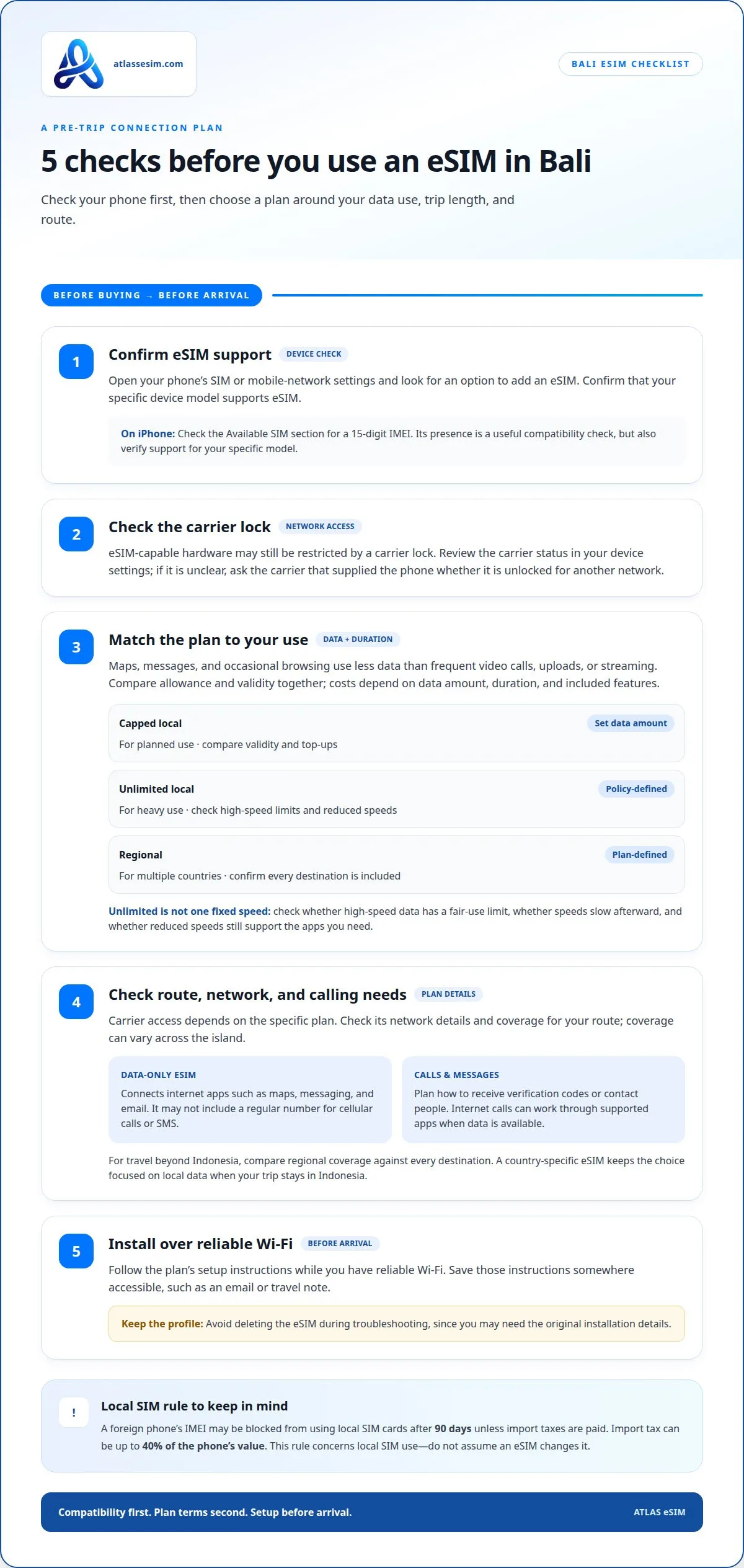
Checking phone eSIM compatibility and carrier lock status
Check your device before buying an eSIM. On an iPhone, open the Available SIM section and look for a 15-digit IMEI number. Its presence is a useful compatibility check, but also confirm that your specific model supports eSIM. Menu labels can differ across devices, so use your phone’s settings or device information to find its SIM details.
Compatibility alone isn’t enough. A carrier-locked phone may restrict which networks it can use, even when its hardware supports eSIM. Check the carrier-lock status in your device settings. If it’s unclear, ask the carrier that supplied the phone whether it’s unlocked for use with another network.
- Check eSIM support: Find the SIM or mobile-network settings and look for an option to add an eSIM.
- Find the IMEI: On iPhone, check Available SIM for the 15-digit identifier.
- Check the lock: Review the device’s carrier status before purchasing a plan.
- Keep the details: Save the eSIM instructions somewhere accessible, such as an email or travel note.
Install the eSIM while you have reliable Wi-Fi, and follow its setup instructions. Avoid deleting the profile during troubleshooting, since you may need its original installation details. Before you arrive in Indonesia, decide which line will handle mobile data and which will remain available for your usual calls or texts.
After landing, select the travel eSIM for mobile data and check that it connects to a network. If data doesn’t work, confirm the eSIM is enabled and selected for data, then follow its connection instructions. WhatsApp messages and calls need internet access. An unlimited-data label won’t resolve a phone compatibility issue, so check your device and carrier-lock status first.
How much do Bali eSIM plans cost by data amount and duration?
Plan cost depends on the data allowance and how long the plan remains active. A short visit with light use calls for a different allowance than remote work, frequent video calls, or hotspot sharing. Compare the total data and validity together. A low-data plan may cost less upfront, but could run out before your trip ends.
Listed Indonesia plan options range from 1 GB up to 20 GB of data. Plan durations vary, so check that a plan remains active throughout your trip. Treat allowance and validity as separate criteria: a larger data pack won’t help if it expires before your itinerary finishes. Check when validity begins, such as at installation or first connection, before deciding when to set up the eSIM.
- Light use: Estimate data for maps, messages, and occasional browsing.
- Regular use: Include social media, photo uploads, and daily navigation.
- Heavy use: Account for video calls, streaming, work files, and hotspot use.
Compare the plan’s total allowance with your stay in Bali and any onward travel. If you’ll visit another country, confirm that the destination is included before selecting a regional option. For travel within Indonesia, a local plan keeps the comparison focused on your time there. Consider whether you’ll rely on hotel Wi-Fi or use mobile data throughout the day.
Don’t choose by data volume alone. Check whether the plan supports the way you use data and whether its validity covers your full itinerary. A capped allowance gives you a defined amount to manage; an unlimited plan still requires a careful review of its terms and speed policy. Compare the displayed price, allowance, and duration, then choose the combination that fits your expected use.
Compare data plans for your Indonesia trip by matching the allowance and validity to your itinerary.
Atlas eSIM
Atlas eSIM offers Local eSIM data plans and Regional Plans for a Bali trip. A local plan suits travel focused on Indonesia, while a regional plan can fit an itinerary that continues across multiple countries. Choose based on your destinations and expected data use, not just the plan label.
Before choosing, match the plan’s coverage area and data allowance to your route. Atlas eSIM displays the price and allowance upfront, and customers usually receive an installable QR code in under 60 seconds. This makes it easier to review the key plan details and prepare your eSIM before departure.
If you’d like help choosing an option for your itinerary, contact Atlas eSIM.
Get your Bali connection ready before departure
Your connectivity plan should fit the way your trip unfolds, not just your first stop. Consider where you’ll need internet access, which phone line you want for everyday calls, and how you’ll stay in touch on travel days. Planning these details ahead can make it easier to settle in and focus on your trip instead of sorting out settings on arrival.
Choosing the best eSIM for Bali starts with a plan that suits your route and your own use. If you want help deciding which option fits, contact Atlas eSIM for help. Share the shape of your trip and what you expect to do online, then choose with a clearer sense of what you need. A little preparation now can leave you free to enjoy the journey ahead.
Frequently Asked Questions
Are there unlimited travel eSIMs for Bali?
Yes, unlimited-data travel eSIMs are available for trips to Bali, including Atlas eSIM options. “Unlimited” doesn’t necessarily mean full speed without conditions, so review the plan’s fair-use rules upfront. Consider whether you’ll use video calls, navigation, or uploads each day, too. These activities can make speed policies and hotspot terms more important than the unlimited label.
Can I share data with other devices?
Yes, you can share an eSIM connection through hotspot or tethering when the plan and phone support it. Hotspot is available on most Atlas eSIM plans, and availability is shown on each plan page before checkout. You could connect a laptop for email or a tablet for maps, then monitor your phone’s data use. Connected devices share the plan’s allowance.
How do I activate my eSIM?
Install the eSIM by scanning its QR code from checkout or from “My eSIMs.” The Atlas eSIM app isn’t required for activation. Use a stable internet connection during installation, follow your phone’s prompts, and keep the QR code accessible until setup finishes. After installation, select the eSIM line and data settings according to its instructions.
Should I get a normal SIM card or an eSIM?
Choose an eSIM if your phone supports it and you want to install a travel data plan digitally. It installs as a secondary digital line, so you can keep your home SIM active for calls and SMS. A physical SIM may be an option for a phone without eSIM support. Your choice also depends on whether you need mobile data only or local calling features.
What are the best eSIM providers for Bali in 2026?
There isn’t one best provider for every Bali itinerary. Atlas eSIM offers local and regional data plans, so the right fit depends on whether you’re staying in Indonesia or traveling onward. Compare destination coverage, data allowance, validity, hotspot availability, and any fair-use terms. These details help you match a plan to your route and actual phone use.
Which Bali eSIM offers the fastest 4G or 5G speeds?
No single eSIM can be named the fastest for every Bali location based on its network label alone. Actual speeds can vary with local coverage, network congestion, device capability, and where you’re using your phone. A 5G label doesn’t ensure faster service at every stop. For a realistic comparison, consider the network and coverage information alongside your travel route.