
ESIM Costa Rica: Choosing a Low-Cost Travel Data Plan
Find a low-cost eSIM Costa Rica plan that fits your trip. Compare data, validity, fair-use limits, coverage, and setup tips before you travel with confidence.
The cheapest eSIM for Costa Rica is the plan that gives you enough data for your trip without paying for more than you’ll use. Some unlimited-data plans may still apply a fair-use limit of 2 GB per day. Match the allowance to your needs, from maps and messages to video calls and streaming.
It makes sense to look for a low-cost eSIM Costa Rica plan, especially if you want to avoid surprise charges and get connected after landing. Compare the data allowance, plan duration, and any fair-use rules, not just the word “unlimited.”
This guide explains how to choose an eSIM for Costa Rica, what unlimited data can mean, and how to install and activate a plan. You’ll also learn what to check in the plan details so you can prepare before traveling and get online with fewer hassles.
Key Takeaways
- Choose a plan around where you’ll travel and how you’ll use data, since coverage and connection speeds can vary.
- Unlimited data may come with a fair-use limit, so check how the plan handles daily use before choosing.
- Install your eSIM before departure, then follow the activation steps when you’re ready to connect in Costa Rica.
- Compare the data allowance and validity period to your trip needs to find a low-cost option that fits.
Table of Contents
What Is The Cheapest eSIM For Costa Rica?
The cheapest eSIM for Costa Rica is the one that balances enough data with coverage along your route. Kölbi (ICE) ranked first for coverage in an Opensignal ranking. Use the partner network as a comparison point, especially if your trip includes places beyond San José.
Alternatives include roaming, a physical SIM card, and a local prepaid SIM.
Does an eSIM for Costa Rica include a local phone number? A travel data eSIM is for mobile internet, so don’t assume it includes a local number. Internet-based messaging and calling apps work over data or Wi-Fi.
Which phones work with Costa Rica eSIM providers? Your device needs eSIM capability and must be unlocked to use another network. Check your phone’s cellular settings for an option to add an eSIM before choosing a plan.
Can you use an eSIM for Costa Rica for hotspot and tethering? Yes, if the plan supports hotspot use. This lets a compatible phone share its mobile connection with another device, such as a laptop.
Connection speed depends on the network and your location. Costa Rica’s 5G network is very limited in 2026 and is mostly available in San Juan city center. Outside that area, the partner network and local coverage shape your mobile experience.
Before buying, list your stops, from San José to coastal or rural areas. Compare the plan’s partner network and data allowance with the places where you’ll navigate, message, or use a hotspot. A low-cost option is most useful when its coverage suits your itinerary and its data allowance meets your daily needs.
Are there eSIMs for Costa Rica with unlimited data?
Yes, some plans offer unlimited data, but “unlimited” may come with a fair-use limit. For an eSIM for Costa Rica, some unlimited plans may limit high-speed use to 2 GB per day. Read the plan terms to understand what happens after reaching that daily amount, such as whether speeds change or usage continues differently.
Choose between unlimited and capped data by estimating your typical daily use. Maps, messaging, and browsing usually need less data than video calls, streaming, or hotspot use. If your trip involves remote work or regular video calls, consider how the plan’s fair-use rules affect those activities. For occasional directions and messages, a capped allowance may be a better fit.
Validity matters as much as data. Match the plan period to your travel dates, including arrival and departure days. Check when validity begins, since it may start at purchase, installation, or first connection. This helps prevent the plan from expiring before your stay ends.
For a practical comparison, note your trip length and daily data needs before you buy. Then compare eSIM plans for Costa Rica by total data, fair-use rules, validity, and listed price. Check whether data comes as one total allowance or resets daily. The same advertised allowance can work differently depending on its structure.
Unlimited data can simplify planning for heavier use, but you still need to read the terms. A capped plan may suit lighter use if its allowance covers your expected activities. Choose based on how you’ll use mobile internet, how long the plan lasts, and what happens when a daily limit is reached. These details help you match the plan to your itinerary.
ESIM installation and activation
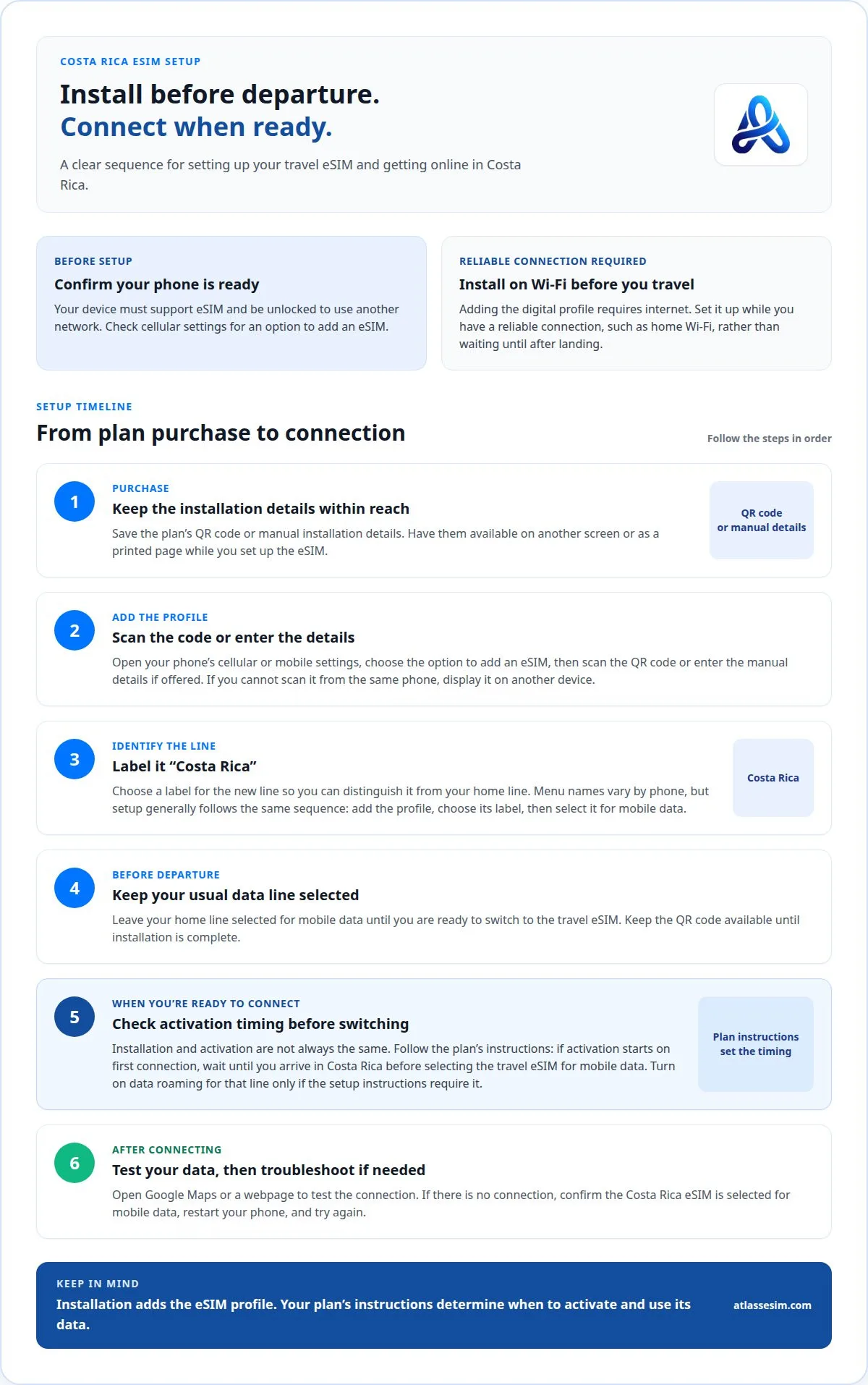
Install your Costa Rica eSIM while you have a reliable internet connection, such as home Wi-Fi. Installation adds a digital mobile profile to your phone, so you’ll need internet during setup. Don’t wait until you’ve lost access after landing.
Before buying, confirm that your phone supports eSIM and is unlocked. An unlocked phone can use a mobile plan from another network. Installing an eSIM doesn’t require showing identification; follow the purchase and setup steps provided for the plan.
Use this sequence to prepare:
- Purchase the plan and keep its QR code or manual installation details accessible on another screen or printed page.
- Open your phone’s cellular or mobile settings, choose the option to add an eSIM, then scan the QR code or enter the details.
- Label the new line, such as “Costa Rica,” so you can select it separately from your home line.
- Keep your usual line selected for data until you’re ready to switch to the travel eSIM.
Menu names vary by phone, but setup generally follows the same steps: add the profile, choose its label, then select it for mobile data. Keep the QR code available until installation is complete. If you can’t scan it from the same phone, display it on another device or enter the manual details if offered.
Install before departure so you don’t have to rely on airport Wi-Fi. Activation timing depends on the plan’s instructions, so distinguish installing the profile from turning on its data line. If activation starts on first connection, wait until you arrive in Costa Rica before selecting the eSIM for mobile data. Then turn on data roaming for that line only if the plan’s setup instructions require it.
Once connected, open Google Maps or a webpage to test your data. If there’s no connection, confirm that the Costa Rica eSIM is selected for mobile data, then restart your phone and try again.
Cheapest Costa Rica eSIM options
The cheapest choice depends on how much data you’ll use and how long you’ll stay. Compare the total plan price, data allowance, validity, and partner network rather than choosing based on the lowest price alone. A small allowance may suit a short visit focused on maps and WhatsApp. Video calls, streaming, and hotspot use can consume data faster.
Local prepaid SIM cards are another option in Costa Rica. They may suit travelers who want a local option and can use a physical SIM card. An eSIM can be more convenient if your device supports it and you’d rather set up mobile data before you arrive.
Use these steps to compare options:
- Write down your travel dates, then match the plan’s validity to your stay.
- Estimate your daily use, including maps, browsing, video calls, and hotspot sessions.
- Check the included data and partner network for the places on your itinerary.
- Compare the total cost for the full trip, not just a short validity period.
Roaming is another alternative, but charges can rise with data use. Your home carrier’s terms determine the cost, so review them before departure. Background updates and video, for example, can use data even when you aren’t actively browsing. Download maps and travel details over Wi-Fi before you need an internet connection on the road.
For a single-country trip, compare a local Costa Rica plan with roaming and local prepaid options. If your itinerary crosses borders, consider whether a regional plan better suits your route. Compare the plan price and data allowance, then choose the lowest total cost that matches your expected use.
Compare Costa Rica data plan options for your travel dates and expected data use.
Atlas eSIM
Atlas eSIM offers Local eSIM data plans and Regional Plans for travelers heading to Costa Rica. A local plan suits a trip focused on Costa Rica, while a regional plan can fit an itinerary across multiple destinations. Plan details show the price and data allowance upfront, helping you compare what’s included with your travel dates and expected use.
After choosing a plan, customers usually receive an installable QR code in under 60 seconds. Install the eSIM with an internet connection, then follow the plan’s instructions to activate it at the right time for your trip. This option suits travelers who want to prepare mobile data before arrival without swapping a physical SIM card.
If you’d like help choosing a suitable plan for your route, contact Atlas eSIM.
Get Set for a More Connected Trip
Before you travel, make connectivity part of your arrival routine. Decide which tasks need mobile data right away, such as messaging your accommodation, opening directions, or arranging transport. Keep essential booking details accessible offline too, so your first steps don’t depend on finding an internet connection.
Choosing an eSIM for Costa Rica is also a chance to plan around how you travel, not just where you’re going. A relaxed beach stay, a work trip, and an itinerary with several stops can call for different data priorities. Knowing what you need makes the plan choice more practical.
Atlas eSIM offers Local eSIM data plans and Regional Plans for travelers preparing for different kinds of itineraries. If you’d like help deciding what fits your route, contact Atlas eSIM for help.
Prepare your connection before departure, and give yourself one less detail to manage after landing.
Frequently Asked Questions
Which Costa Rica eSIM providers offer coverage, and which local networks do they use?
Travel eSIMs connect through local partner networks, and coverage depends on the network used by each plan. According to Opensignal, Kölbi (ICE) ranked first for coverage in Costa Rica. Use that as a reference when assessing connectivity along your route, and compare coverage in city, coastal, and inland areas rather than relying on a provider’s name alone.
How much do Costa Rica eSIM plans cost for different data amounts and durations?
Plan prices vary with data allowance, validity, and whether you choose a capped or unlimited package. Atlas eSIM prepaid plans show the price before checkout, so compare the total cost for your trip rather than judging by the allowance alone. A short stay with light browsing may suit a smaller data pack, while longer trips or regular hotspot use can call for more data.
Which Costa Rica eSIM plans include unlimited data or phone calls and SMS?
Some Costa Rica eSIM plans offer unlimited data, though some may apply a fair-use limit of 2 GB per day. A data eSIM doesn’t automatically include voice calls or SMS. Atlas eSIM installs as a secondary digital line, so you can keep your home SIM active for calls and SMS while using the eSIM for mobile data.
How do I buy, install, activate, and top up a Costa Rica travel eSIM?
Buy a prepaid plan online, then install it by scanning the QR code from checkout or My eSIMs; the app isn’t required for activation. The Atlas eSIM app can help manage and top up an eSIM. Most iPhone XS and newer models, and many recent Android devices, support eSIM; check the compatible devices list before purchase. Support is available 24/7 via WhatsApp or email.
Is Costa Rica eSIM coverage reliable in San José, beaches, rural areas, and national parks?
Coverage follows the local network, so service can vary between San José, coastal areas, rural roads, and national parks. A coverage map can guide your planning, but your route may include places with different signal conditions. Download maps and key travel details before leaving Wi-Fi, especially for drives or hikes where you may need directions without a steady mobile connection.